Featured

    Featured Posts

    We serve you tech

Facebook Messenger for Windows

Hey are you facing any trouble with your Facebook chat?Here you can fix your chat with this. Or do you wanna chat while using an app or you wish to use Facebook chat on your Desktop without logging in? or while visiting a website? here Facebook provides you with an awesome app which can fulfill many of your wants.Facebook has launched a Facebook Messenger targeting on Windows users.It is promoted for Windows users all over the world.


Features:

1)One can see and respond to chats right from the desktop.
2)You dont have to click away to stay connected.
3)Lets you find new Photo tags,Comments and more as soon as they happen.
4)You can chat and read the newsfeed from the desktop itself.

This is the Preview of the Facebook Messenger for Windows:


Now Facebook is Busy working on a Desktop Messenger for Mac users.The windows version of messenger is focusing on squeezing each and every drop of engagement from its users.So are you ready to give it a try? then Download it from here.

Cheers...:)

How to Temporarily Disable/Deactivate Facebook Account

Most of us are always active on the social networking website Facebook. But sometimes you may feel like to stay away from Facebook for a short time,it must be for your studies or some other issues.It is possible to Disable your Facebook account for a short period instead of Permanently deactivating it.So here i am showing you "How to Temporarily Delete Facebook account".Follow these steps:


1)Log in to your Facebook account.


2)Now click on Account and then Account settings from the top right corner.


3)Now when the next page appears click on the "SECURITY" tab.


4)And in the security settings page click on "deactivate your Account".


5)Now in the next page choose the reason for leaving as "This is temporary,i ll be back" and choose confirm.


Also feel free to checkout these cute Best Whatsapp Status and some of the most electrifying Whatsapp Status Ideas that will blow you at the moment and we will like to hear from you regarding it.

6)Now a window appears,enter your password there and choose Deactivate now.


7)Now your account is temporarily disabled which means people will not be able to see your profile or find you in searches on Facebook.You can reactivate your account whenever you want by just typing your email and password in the log in page.Reactivating your account may not restore your Groups and Events but your friends,Pages etc will be saved and are secured.

So this is exactly How To Temporarily Deactivate Facebook Account and we hope you would appreciate it.

How to embed Facebook videos on your blog

Most of us find it easy to share Youtube videos on our blog,but most of you must have also thought of embedding Facebook videos.Here i will show embedding Facebook videos step wise.

1)Go to your desired Facebook video,on the bottom right corner you will see an option "Embed This Video"


2)Now copy the embedded code and paste it on your blog

3)Thats it,now you had successfully embedded your Facebook video on your blog


How to add Profile pic in Facebook chat

All of us use to chat via Facebook.Smileys are one important part of the chat,but using the same smileys everyday is not that awesome,so lets try something new.What if we could add our Facebook profile picture as a smiley? that must be Intresting.You can also use the profile pic of any user or any Facebook page as a smiley in chat.So here i am showing you "HOW TO ADD YOUR PROFILE PIC OR PAGE'S
PIC AS A SMILEY IN FACEBOOK CHAT"

1)Log on to Facebook


2)Now find the user id of the profile or the page id of the Facebook page as i had shown in my recent post HOW TO FIND FACEBOOK USER ID OF PAGE/PROFILE


3)Now just copy the Facebook profile id or page id with double brackets, For ex:  [[11507325966]]


4)Pate this to your Facebook chat during a conversation and it will appear as the profile pic of the page/person selected,then it will look like this:


5)Done,now you can try some of the famous profile Id's given below


Need for speed carbon: [[11507325966]]


Chuck Norris: [[46637413257]]

Pirate: [[CaptainJackSparrow]]

Santa Claus: [[TheMagicOfSantaClaus]]

Vin Diesel: [[VinDiesel]]

How to hide facebook profile from serach engines

Whenever somebody searches your name on a search engine like Google it is easy for them to find your Facebook account as it will be displayed among the top search results.Strangers may easily take advantage of this and may keep stalking you.So many of the people find this as lack of their privacy,so it is very  much important to hide your Facebook profile from search results.Now for your privacy  i am teaching you "HOW TO PROTECT YOUR FACEBOOK PROFILE FROM APPEARING IN SEARCH RESULTS".


1)Log on to Facebook


2)Click on "Privacy settings" from top right corner,then click on "Edit your settings" under
 "Apps and Websites" tab


3)Now at the bottom most you will see "Public search" and on the right bottom an "Edit settings" tab,click on edit settings,now you can choose to "enable" or "Not to enable" public search for your account.


4)At the moment a Pop up box will appear to confirm your selection,click on confirm


5)Now its done your Facebook account will no longer appear in search results.
(NOTE: This is only applicable for users above 18)


How to remove Facebook timeline profile

Many of the facebook users dislikes the New facebook timeline profile.And they wants to remove it so as to get their old profile look.So here i am teaching you "how to get rid of Facebook timeline".


For Google chrome users:
1)Right click on the google chrome icon and choose properties

2)Now you will see a target box,leave a space and add the following code after "chrome.exe"

For windows7/vista users:--user-agent="Mozilla/4.0 (compatible; MSIE 7.0; Windows NT 6.0)"
For Xp users:--user-agent="Mozilla/4.0 (compatible; MSIE 7.0; Windows NT 5.1)"

3)Click on APPLY,then OK

4)Now restart Chrome

4)Log on to your Facebook account and you will see the old profile .

For Firefox users:

1)Open Firefox browser,click the Firefox button,and select add-ons

2)In the add on window look for search bar on the top right corner,search for "user agent switcher",
on completing the search install the "USER AGENT SWITCHER",then restart Firefox

3)Now you will see an add on button in the navigation bar,if not right click on navigation bar
 choose customize  and drag the add on to navigation bar

4)Now just click on the user agent button,choose internet explorer,then internet explorer7


5)Now log on to Facebook and you can see your old Facebook profile.

How to find fake profiles on facebook

Now a days facebook is flooded with too many fake accounts.And a lot of people gets fooled
by fake accounts.So its time to give full stop to such fake profiles.Here i am showing you how to detect nonreal facebook users.

1)Go to the suspect's account:


2)Now go to Google images and drag the suspect's profile pic into the image search:

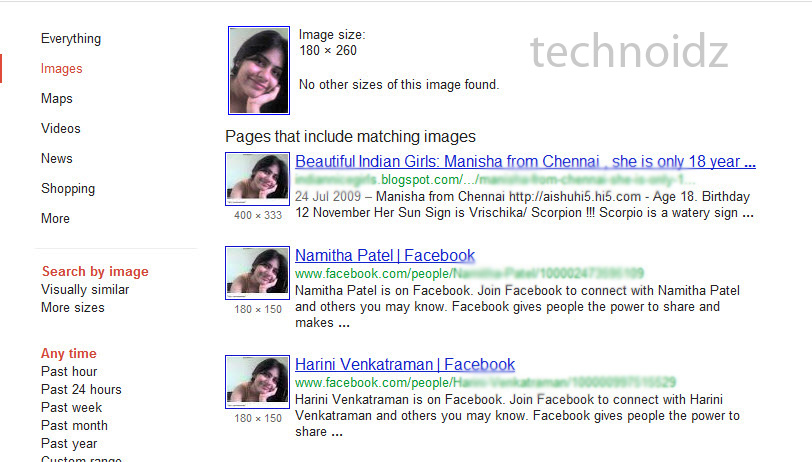
3)Now you could see results in Google with this image which may look like this if its fake:

4)Now feel free to delete such fake friends from your list.


How to find Facebook user ID of Page/Profile

Many people have trouble in finding their Facebook user Id of their Page/Profile:

So this is all you have to do in finding it:
(NOTE: This is only applicable for Firefox users)

1)Log in to Facebook

2)Now right click on the Profile pic of the Page/profile an select "view image info":


3)Now you will see the page info box,where you can find your Page/Profile's user ID:


4)The Outlined area will be your ID

www.CodeNirvana.in

Copyright © Technoidz